
How I Use Imagen AI to Elevate My Wedding Photography Editing
One of the questions I hear most often from couples and photographers is:
“How do you edit so consistently and still deliver galleries so quickly?”
The answer isn’t rushing.
It isn’t cutting corners.
And it definitely isn’t outsourcing my style.
The answer is Imagen AI and the way it’s transformed my photography editing workflow while still allowing me to personally hand-finish every gallery.
Why Editing Time Is So Important in Professional Photography
Wedding photography doesn’t end when the day is over. In many ways, it truly begins in post-production, where the story of the day is shaped, refined, and brought to life. Long before I began using Imagen, editing a full wedding gallery often required forty or more hours of focused work. Every image needed careful attention, from ensuring skin tones felt natural and true, to balancing light across wildly different environments, to creating a gallery that flowed cohesively from start to finish.
That process also meant being vigilant about the details that quietly impact how an image is experienced. Visual distractions, subtle color shifts, or small compositional tweaks can be the difference between a photo that feels good and one that feels complete. For years, photographers, myself included, were often forced into an uncomfortable choice between delivering galleries quickly or editing them with the level of precision they deserved.
I was never willing to sacrifice either.
What Imagen AI Actually Does (and What It Doesn’t)
Imagen AI is a professional photo editing tool that learns my personal editing style and applies it consistently across an entire gallery. Instead of generic presets, Imagen:
Learns how I handle color, exposure, and contrast
Matches my natural skin tones
Applies edits that align with my brand aesthetic
And the even more beautiful part is that Imagen is always learning my style and the choices I make, so it’s especially important to be using the fine tuning feature. Once you finish a gallery and deliver it, be sure to upload the final images so Imagen can compare what it did for you initially and see the tweaks you made later. THIS is how it keeps learning your style!!
What Imagen doesn’t do is replace my eye, my taste, or the final polish that makes an image feel finished. It doesn’t make creative decisions for me, and it doesn’t dictate what matters in a photograph. What it does do is create a beautifully consistent foundation and one that mirrors my style closely enough that I can stop repeating the same technical adjustments over and over again.
That shift is everything.
Because Imagen handles the heavy lifting of base edits, I’m able to slow down where it actually matters. Instead of spending hours correcting exposure or color across an entire gallery, I can focus on refining individual images with intention. I have the time and mental space to notice the small distractions that pull your eye away from the moment, an exit sign in the background, a stray object at the edge of the frame, a composition that just needs a bit more breathing room or a tighter crop to tell the story.
I’m also able to be more thoughtful with skin tones, adjusting them image by image rather than relying on a one-size-fits-all approach. Hero images get the attention they deserve, with extra care given to balance, tone, and subtle details that elevate a photo from “beautiful” to “timeless.”
This is the part of editing that can’t be automated: the human decisions, the quiet refinements, the instinct that comes from years of experience. Imagen gives me the time to do that work well, and that’s where the real magic happens.
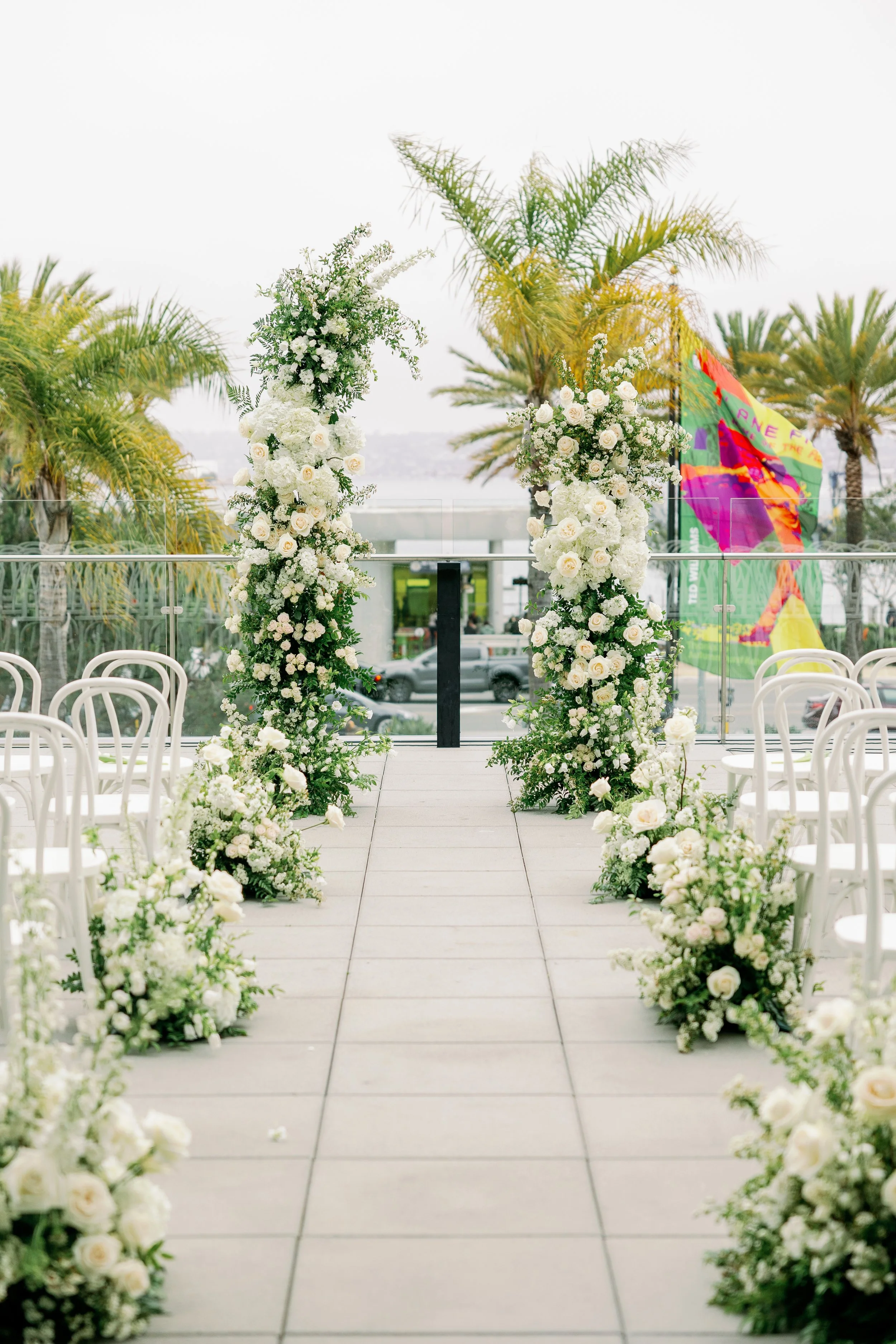
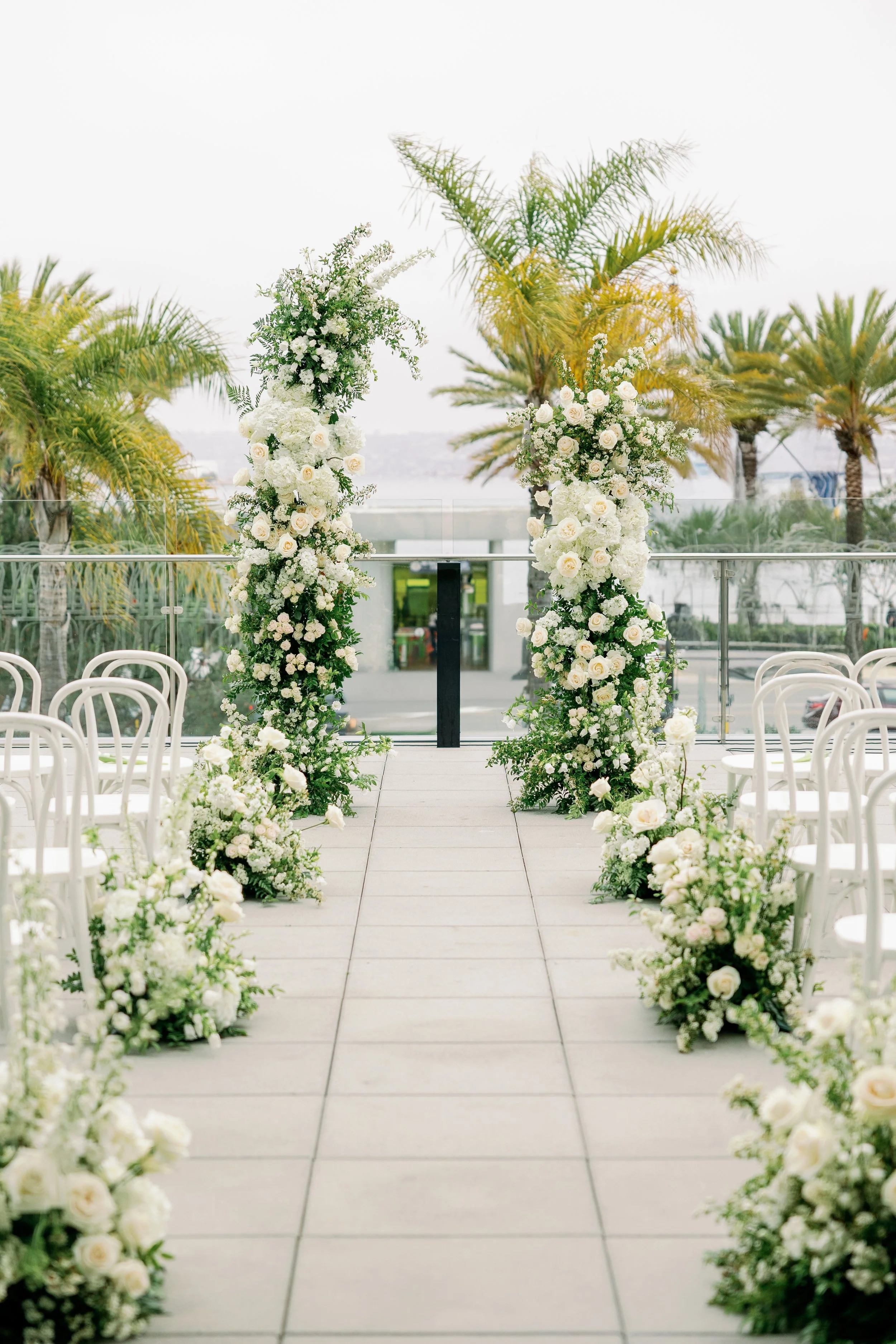
In the example below: you can see the refinements I was able to make to this ceremony detail image. That hideous flag, GONE! The busy street below, POOF! The consistency Imagen gives me straight out of their app allows me the time and energy to make these delicate hand edits that drastically elevate the overall photo.
Consistency Across Tricky Lighting Conditions
Wedding days move through a wide range of light, often without pause. Bright midday sun gives way to dim ceremony spaces, indoor receptions, and eventually the softness of golden hour, all within the same timeline. Maintaining a cohesive visual story across those shifts has always been one of the most challenging parts of editing. Imagen helps create consistency through those transitions, allowing the gallery to feel unified rather than disjointed. The final collection reads as one continuous story, with color, tone, and mood flowing naturally from beginning to end. The result is a gallery that feels intentional and polished, no matter how varied the lighting conditions were throughout the day.
The result is a gallery that feels intentional, polished, and visually cohesive from start to finish.
Faster Turnaround Without Cutting Corners
Using Imagen has also allowed me to shorten turnaround times without cutting corners. Faster delivery doesn’t come from rushing or lowering standards, but from removing repetition from the process. My couples receive sneak peeks sooner and full galleries more quickly, while still receiving images that feel carefully finished and thoughtfully refined. For me, that efficiency translates into more creative energy and more time to focus on the details that elevate the work, rather than feeling pressed to move on to the next deadline.
Imagen for Photographers: Why I Recommend It
If you’re a photographer wondering whether AI editing tools are worth it, here’s my honest answer:
Imagen isn’t about doing less — it’s about doing better.
When photographers ask whether AI editing tools are worth it, my answer is always the same. Imagen isn’t about doing less work, and it certainly isn’t about giving up control. It’s about working smarter in a way that supports long-term sustainability. It allows photographers to grow without losing their signature style, to stay consistent without burning out, and to spend their time refining what matters most instead of repeating the same technical steps over and over again.
If you want to see how Imagen could fit into your own workflow, you can try it with my code below.
✨ Use my Imagen discount code:
👉 Try free with 1500 photos!
You’ll get free edits to test it out and see how it learns your style.
Final Thoughts
Photography is about intention, connection, and storytelling. Imagen gives me time back. Time to refine, to perfect, and to deliver galleries that feel elevated and complete.
And that’s something I’ll never compromise on.